ShopDreamUp AI ArtDreamUp
Deviation Actions
![[OPEN] TRANSFORM - 24](https://images-wixmp-ed30a86b8c4ca887773594c2.wixmp.com/f/bfc99206-9412-4f3c-9bf6-a4000095d212/dgwrdpy-d22f10bc-f1ca-4a31-99f7-a930639d3bc6.png/v1/fill/w_332,h_250,q_70,strp/_open__transform___24_by_haandae_dgwrdpy-250t.jpg?token=eyJ0eXAiOiJKV1QiLCJhbGciOiJIUzI1NiJ9.eyJzdWIiOiJ1cm46YXBwOjdlMGQxODg5ODIyNjQzNzNhNWYwZDQxNWVhMGQyNmUwIiwiaXNzIjoidXJuOmFwcDo3ZTBkMTg4OTgyMjY0MzczYTVmMGQ0MTVlYTBkMjZlMCIsIm9iaiI6W1t7ImhlaWdodCI6Ijw9OTI4IiwicGF0aCI6IlwvZlwvYmZjOTkyMDYtOTQxMi00ZjNjLTliZjYtYTQwMDAwOTVkMjEyXC9kZ3dyZHB5LWQyMmYxMGJjLWYxY2EtNGEzMS05OWY3LWE5MzA2MzlkM2JjNi5wbmciLCJ3aWR0aCI6Ijw9MTIzMiJ9XV0sImF1ZCI6WyJ1cm46c2VydmljZTppbWFnZS5vcGVyYXRpb25zIl19.X88WhaatpmTc5D-Tzqjqa0ITcXHzBpjm0m5FQe-LB_U)



![Zepha Skin V2 [Rainmeter]](https://images-wixmp-ed30a86b8c4ca887773594c2.wixmp.com/i/9f27f1fc-d549-435c-9722-8e816b7cb239/d5fagkq-67aaf9f7-d3b3-462e-9aea-e37091e02cb3.png/v1/crop/w_184,h_184,x_28,y_0,scl_0.20444444444444,q_70,strp/zepha_skin_v2__rainmeter__by_ani07789_d5fagkq-92s-2x.jpg)
![Zepha Skin V2 [Rainmeter]](https://images-wixmp-ed30a86b8c4ca887773594c2.wixmp.com/i/9f27f1fc-d549-435c-9722-8e816b7cb239/d5fagkq-67aaf9f7-d3b3-462e-9aea-e37091e02cb3.png/v1/crop/w_92,h_92,x_14,y_0,scl_0.10222222222222,q_70,strp/zepha_skin_v2__rainmeter__by_ani07789_d5fagkq-92s.jpg)



Badge Awards
Description
Feel free to show your support and appreciation
Like my work?
Instructions
For Portable
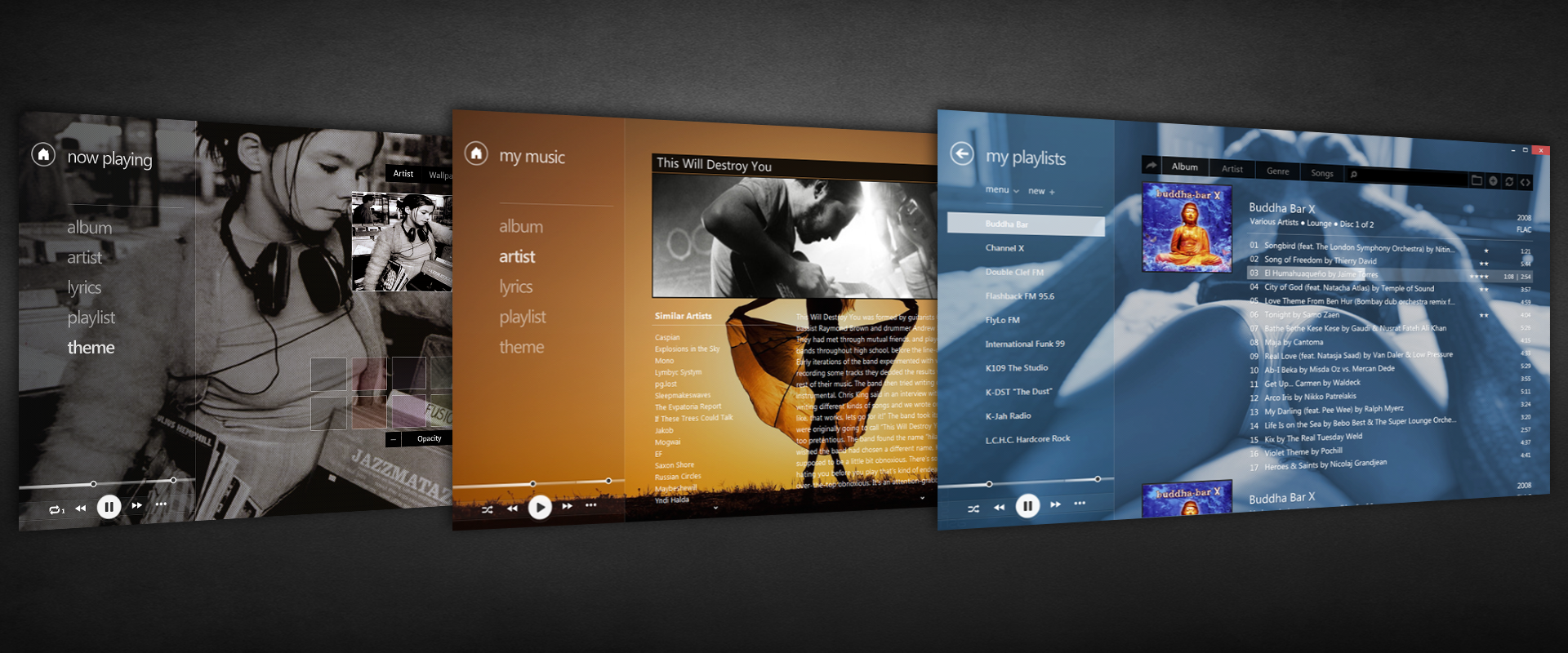
1. Extract the contents of this download directly into your foobar2000 folder.
For Standard
1. Extract to "C:\\Program Files (x86)\\foobar2000\\"
1a. Also extract the "Configuration" folder to "C:\\users\\appdata\\roaming\\foobar2000\\"
2. Install the provided font located in skins->Zetro->font (only if you do not have Segoe UI)
Make sure to look in the provided Help folder for more instructions. (The help files were made for an older version of Zetro but are still applicable)
If you want credit for your image, just say so
If you want an image removed, you can say that too
Like my work?
Instructions
For Portable
1. Extract the contents of this download directly into your foobar2000 folder.
For Standard
1. Extract to "C:\\Program Files (x86)\\foobar2000\\"
1a. Also extract the "Configuration" folder to "C:\\users\\appdata\\roaming\\foobar2000\\"
2. Install the provided font located in skins->Zetro->font (only if you do not have Segoe UI)
Make sure to look in the provided Help folder for more instructions. (The help files were made for an older version of Zetro but are still applicable)
If you want credit for your image, just say so
If you want an image removed, you can say that too
Comments1292
Join the community to add your comment. Already a deviant? Log In

For those using the file I uploaded sometime ago (located below in the comment section) you can safely update to foobar version 2.0 without issues. It will convert the playlist over to 2.0, however, know this is only for the 32 bit version. Foobar has released a 64 bit variant but the Zetro theme breaks because many of the components do not have a 64 bit version. Some of them have not been update for years and the likelyhood of an update are very low.
You may have to find a different theme for the 64 bit version.